
ViaMom: Pregnancy Tracker
PDF Reader ToolsParenting
0.00.00 Reviews
- Version
- 1.0.1
- Installs
- 50.00K
- Age Rating
- Everyone
Screenshots

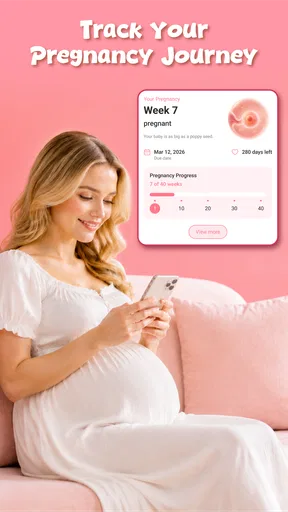
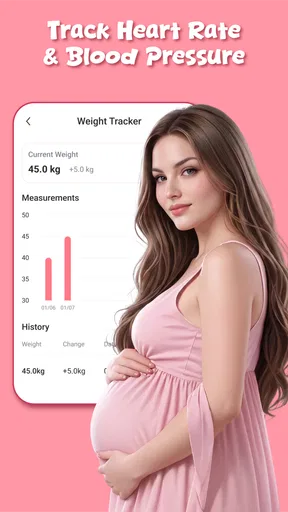
Our Review of ViaMom: Pregnancy Tracker
 Analysis by Appyee
Pregnancy apps are easy to download and surprisingly difficult to choose. Many promise a week-by-week companion, but the useful question is whether the experience fits the way you actually want to follow pregnancy. I found ViaMom: Pregnancy Tracker most interesting as a straightforward parenting app for people who want a simple place to follow pregnancy progress and baby development without turning the process into a medical dashboard.
The app is free, aimed at Everyone, and developed by PDF Reader Tools. It has reached over 50K installs, which makes it a relatively small app compared with the most established pregnancy platforms, but that can also appeal to someone who prefers a less crowded starting point. It runs on Android 7.0 or later, and its current version is 1.0.1. Those details matter because the best tracker is not necessarily the one with the longest feature list; it is the one you will open consistently and understand quickly.
What I looked for before recommending it
My first test for any pregnancy tracker is clarity. Pregnancy is already full of appointments, dates, questions, and changing expectations. An app should make the week-by-week journey easier to follow, not create another stream of confusing information. ViaMom focuses its identity on pregnancy tracking and baby development, so I approached it as a companion for orientation rather than as a replacement for a midwife, doctor, or hospital guidance.
The second criterion is usefulness between appointments. A good tracker can help a person remember where they are in the pregnancy, understand the broad stage of development, and find a calm moment to check what is coming next. That is different from diagnosing symptoms or making decisions about treatment. I would use ViaMom for general context and personal routine, while keeping medical questions for a qualified professional.
I also considered how much effort the app demands. Some people enjoy detailed logs, charts, reminders, community discussions, nutrition tools, and extensive planning sections. Others want to open an app, see the current week, read a concise explanation, and close it. ViaMom makes the most sense for the second group. Its appeal is tied to a focused purpose, so expectations should stay focused too.
A final decision point is whether the app suits a shared routine. Pregnancy information is often viewed by partners, relatives, or friends who want to understand what is happening. A clear week-by-week format can be easier to discuss than a collection of specialist terms. In my view, that makes the app potentially useful for conversation, but I would still check important information against professional advice rather than treating an app entry as a personal medical instruction.
A simple week-by-week starting point
The central idea is easy to understand: follow pregnancy as it progresses and connect each stage with baby development. That structure gives the app a natural rhythm. Instead of searching through unrelated articles, I can return to the current stage and use it as a starting point for reading or conversation.
This is especially helpful early in pregnancy, when people often feel that every week brings a new question. A tracker can reduce the temptation to search randomly for information that may not match the current stage. I found the week-by-week approach more useful when treated as a gentle orientation tool: check the current point, note what seems relevant, and then decide whether anything needs to be discussed with a healthcare professional.
There is also a practical benefit for people who do not want to remember everything. A pregnancy timeline gives a sense of continuity. If I miss a day or two, I can return without feeling that I have fallen behind. That is an important difference from apps built around daily streaks or constant logging, where skipping a session can make the experience feel like work.
Where ViaMom feels strongest
The clearest strength is its narrow focus. ViaMom is not presented as a general family organizer or a broad health platform. It is a parenting app centered on pregnancy tracking and baby development. That makes the first decision easier: if your main goal is to follow pregnancy week by week, the app is immediately relevant.
I also like the possibility of using it as a low-pressure educational routine. A practical approach is to check the current week once, write down one question that comes to mind, and bring that question to the next appointment or conversation with a professional. This avoids a common problem with health content: reading a large amount of material without knowing what is actually relevant to you.
The most useful way to treat ViaMom is as a conversation starter, not a clinical authority. That distinction makes the app safer and more realistic. It can help you organize your attention, but it should not be used to interpret warning signs, confirm a diagnosis, change medication, or decide whether urgent care is needed.
Another advantage is accessibility. The Everyone content rating means the app is positioned for a broad audience rather than a narrowly restricted age group. That does not mean every explanation will suit every reader, but it supports the idea of sharing general pregnancy information with a partner or family member who wants a simple introduction.
Three routines that make it more useful
My first recommended routine is a weekly check-in rather than repeated browsing. Choose one day that already has a natural pause, such as a weekend morning. Open the current pregnancy stage, read with a specific question in mind, and stop when that question has been answered or noted. This keeps the tracker from becoming another source of endless scrolling.
The second routine is to use it before appointments, not instead of them. A few days before a visit, review the current stage and make a short list of anything that feels unclear. The app then becomes a prompt for better questions. This is more valuable than trying to use general development information to assess whether your own pregnancy is progressing normally.
The third routine is partner sharing. If a partner is less familiar with pregnancy milestones, looking at the current week together can create a shared reference point. I would keep the discussion practical: what questions do we have, what should we remember for the appointment, and what support would be useful this week? That is a more grounded use than treating the app as a source of predictions.
A realistic everyday scenario
Imagine someone finishing work late, feeling mentally overloaded, and wanting a quick sense of where the pregnancy stands. They do not need a long article library or a complicated dashboard at that moment. They open ViaMom, review the current week and baby-development context, then note a question for the next appointment. The whole habit can fit into a quiet few minutes without turning pregnancy tracking into homework.
Now imagine a partner who wants to be involved but does not know what to ask. A shared look at the current stage gives both people a common starting point. It can lead to a useful conversation about appointments, practical support, or concerns that deserve professional attention. In this scenario, the app’s value comes less from doing something extraordinary and more from making a recurring conversation easier to begin.
There is a trade-off here. A person who wants detailed personal records may quickly outgrow a focused week-by-week companion. Someone who wants calm orientation may find the same simplicity reassuring. The right choice depends on whether you see pregnancy tracking as a reading habit or as a full personal-management system.
Where another kind of app may fit better
ViaMom may not be the best match for someone searching for a broad pregnancy toolkit. If your priority is appointment management, extensive symptom journaling, nutrition planning, contraction timing, community discussion, or other specialized functions, you may prefer an app category built around those tasks. I would not choose ViaMom expecting it to replace every pregnancy-related tool on a phone.
It may also be a weaker fit for users who want highly personalized medical guidance. Week-by-week development is general by nature. Individual pregnancies can differ, and a general tracker cannot account for every medical history, complication, treatment, or professional recommendation. In that situation, an app with a stronger connection to your care routine may be more appropriate, while ViaMom could remain a supplementary reading tool.
There is a similar issue for people who enjoy detailed customization. If you want to record many kinds of information every day and see long-term trends, a dedicated journal or health-log app may serve you better. ViaMom’s focused identity is a benefit when you want simplicity, but it becomes a limitation when your main goal is comprehensive record keeping.
I would also be cautious about choosing any tracker purely because it feels reassuring. Pregnancy content can sometimes create unnecessary worry when a general description does not match an individual experience exactly. If reading development information makes you compare yourself anxiously with a standard timeline, reduce your use and discuss concerns with a professional. A tracker should support understanding, not increase stress.
What switching to it really involves
Because ViaMom is free, the financial barrier to trying it is low. The more important cost is attention. Every pregnancy app asks you to learn its layout, establish a routine, and decide whether its information is worth returning to. Switching from another tracker can also mean losing the habit of using features that mattered to you, especially if you relied on detailed notes or a broader set of tools.
I would handle the switch gradually. Keep any important personal notes somewhere separate, install ViaMom, and use it for the week-by-week reading experience first. After a short trial, ask yourself three practical questions: Did I open it without forcing myself? Did it help me prepare a useful question or conversation? Did its focused approach feel calming or incomplete?
This method avoids a common mistake: judging a pregnancy app after one quick opening. A tracker is useful only if its structure fits real life. Someone with a busy schedule may value a simple return point, while someone who already maintains detailed records may see little reason to change. The free price makes experimentation easier, but it does not make every missing function irrelevant.
Device compatibility is another part of the decision. The app supports Android 7.0 and newer, so people using an older Android release should check compatibility before planning around it. For supported devices, the current version is 1.0.1. I would keep the app updated when updates are available, particularly because newer releases can improve stability or clarify the experience, even though an update should never be assumed to add a particular feature.
Privacy-minded habits for any pregnancy tracker
Pregnancy information is personal, so I recommend a careful habit regardless of which app you choose. Avoid entering details you do not need for the experience, and do not use a general tracker as the only place where important medical information is stored. Keep appointment details, medication instructions, and urgent-care guidance in the channels recommended by your healthcare team.
It is also worth separating general education from personal records. A week-by-week explanation can help you understand broad development, but it is not the same as a clinical record. If you share the app with a partner, talk about what the information means to you rather than assuming that a general description predicts exactly what will happen next.
That boundary is one of the most important practical insights for using ViaMom well. The app can support a thoughtful routine, but its role should remain limited and clear. Used that way, it is less likely to create false certainty or unnecessary alarm.
My recommendation for different users
I would recommend ViaMom to someone who wants a free, approachable pregnancy tracker with a week-by-week focus. It is particularly suitable for first-time users who want a simple starting point, partners who want an accessible way to follow along, and busy people who prefer occasional check-ins over constant logging.
I would be more hesitant to recommend it as a sole pregnancy-management solution. People who need extensive health records, detailed planning, specialist monitoring, or highly individualized guidance should look toward tools designed for those needs and keep their healthcare team at the center of decision-making.
The app’s relatively modest install base does not tell me whether it will be perfect for a particular person, but it does encourage a realistic approach: try it for its specific purpose rather than assuming it is a complete pregnancy ecosystem. The developer, PDF Reader Tools, has positioned it around a clear parenting use case, and that clarity is more important here than a long list of unrelated functions.
After weighing the alternatives, my view is straightforward. ViaMom: Pregnancy Tracker is worth trying if you want a calm weekly reference and a way to turn general pregnancy information into better questions. It is less convincing for anyone seeking a full medical, journaling, or appointment-management suite. I would keep it as a lightweight companion, use it consistently but not obsessively, and let professional advice guide anything that affects health or treatment.
For that audience, the app does its job best when it stays in the background: open it at a sensible weekly moment, use the current stage to orient yourself, share useful points with someone you trust, and then return to real-world care and support. That balance is what makes this free parenting app a sensible option rather than just another pregnancy download.
Verdict
Strengths of ViaMom: Pregnancy Tracker
- Simple week-by-week pregnancy tracking for first-time parents.
- Includes useful reminders for appointments and prenatal milestones.
- Offers practical tips on nutrition, exercise, and pregnancy wellness.
- Clean interface makes key pregnancy information easy to find.
- Can help partners follow the pregnancy journey and stay informed.
Limitations of ViaMom: Pregnancy Tracker
- Some features or content may require a premium subscription.
- Medical information should not replace advice from a qualified healthcare provider.
- Personalization options may feel limited for high-risk pregnancies.
- Reminder and tracking tools depend on users entering information regularly.
- Some users may find notifications too frequent or generic.
Similar Picks in This Category
View All
Family Space
Motorola Mobility LLC.3.9

شرطة الأطفال - مكالمة وهمية
Oub Apps4.1

Findmykids: Parental Control
LETEM LTD4.6

Pregnancy + | Tracker App
Philips Electronics UK Limited4.8

Policía de niños - para padres
Kids police4.7

Pregnancy App
Amila4.9
Frequently Asked Questions
What is ViaMom: Pregnancy Tracker used for?
ViaMom: Pregnancy Tracker is designed to help expectant mothers follow their pregnancy week by week. It may provide information about fetal development, common pregnancy symptoms, appointments, weight or health notes, and useful reminders. The app is best viewed as an organizational and educational companion rather than a replacement for prenatal care, professional medical advice, or emergency assistance.
Can ViaMom provide accurate information about my baby’s development and due date?
The app can offer general pregnancy guidance based on the information you enter, such as the first day of your last menstrual period or an estimated due date. However, pregnancy development varies from person to person, and an app cannot confirm gestational age or diagnose a condition. Your doctor or midwife should verify your due date and interpret medical information.
Is ViaMom: Pregnancy Tracker suitable for medical monitoring?
ViaMom may help you record symptoms, appointments, questions, and other pregnancy-related details, but it should not be treated as a clinical monitoring device. It cannot replace ultrasound examinations, laboratory tests, consultations, or advice from a qualified healthcare professional. Contact your maternity provider promptly if you experience concerning symptoms such as severe pain, heavy bleeding, or reduced fetal movement.
Does ViaMom require personal or health information to work?
Pregnancy trackers commonly request details such as your due date, pregnancy stage, symptoms, preferences, or notification settings to personalize content and reminders. Before creating an account or entering sensitive information, review the app’s privacy policy and permissions carefully. Check how data is stored, used, shared, and deleted, especially if the app offers cloud synchronization or third-party services.
Is ViaMom: Pregnancy Tracker free to download and use?
Availability, pricing, and included features can vary by platform, region, and app version. The basic download may be free while some content, tools, advertisements, or premium features could require payment or a subscription. Review the store listing and in-app purchase terms before subscribing, and check the cancellation rules so you understand any recurring charges.
